Recipes you can read
Big type, clear amounts, and steps numbered the way you’d cook them. Photos for the dish and for any step.
The family classics, the ones from websites, the one on the back of an envelope. Keep them together in a cookbook you share with the people you cook with, plan the week, shop from one list, and cook with timers that ring even on Silent.
Works without an account, and on the web once you sign in. No ads, no tracking.

Not My Best Cookbook isn’t a magazine and doesn’t want your attention. It’s the book on your counter: your recipes, the week’s plan, the list for the shop, and a cook mode you can read from across the kitchen.
Big type, clear amounts, and steps numbered the way you’d cook them. Photos for the dish and for any step.
Paste a recipe website, a note, an email or a Markdown file. The title, times, servings, ingredients and steps come across, ready to check.
Cook for 2 or for 12. Quantities scale as real fractions, and switch between US and metric in a tap.
One step at a time, in type you can read from the stove, with the screen kept on while you cook.
Any step with a time gets a timer. Run several at once, see them on the Lock Screen, and hear them even on Silent.
Put recipes and meals on the days you’ll cook them. Step through the weeks and see what’s planned at a glance.
Add a recipe or the whole week. Ingredients merge (two recipes’ garlic is one line) and sort by aisle.
Invite family as editors or viewers. Recipes, the menu and the shopping list stay in step on everyone’s phone.
When you need an idea, search a library of more than 70,000 recipes and save the ones you like to your own cookbook.
Calories, protein, carbs, fat, fiber and sodium per serving, estimated from USDA data for the ingredients it can match.
Send a link anyone can open in a browser, no app needed. People who have the app can save their own copy.
Your recipes live on your iPhone first, so the kitchen with no signal is fine. Changes back up as soon as you’re online.
Tabs that open into a sidebar, roomier recipes with ingredients beside the method, and a cook mode that fills the screen.
Start cooking straight away. Sign in later with Apple or your email to back up, use more than one device, and share.
No ads, no tracking, no analytics in the app. Your cookbooks are visible only to the people you invite. Privacy policy.


Type ingredients one per line, as you would on paper. The app works out the amount, the unit and the ingredient, and tells you if a line didn’t make sense.

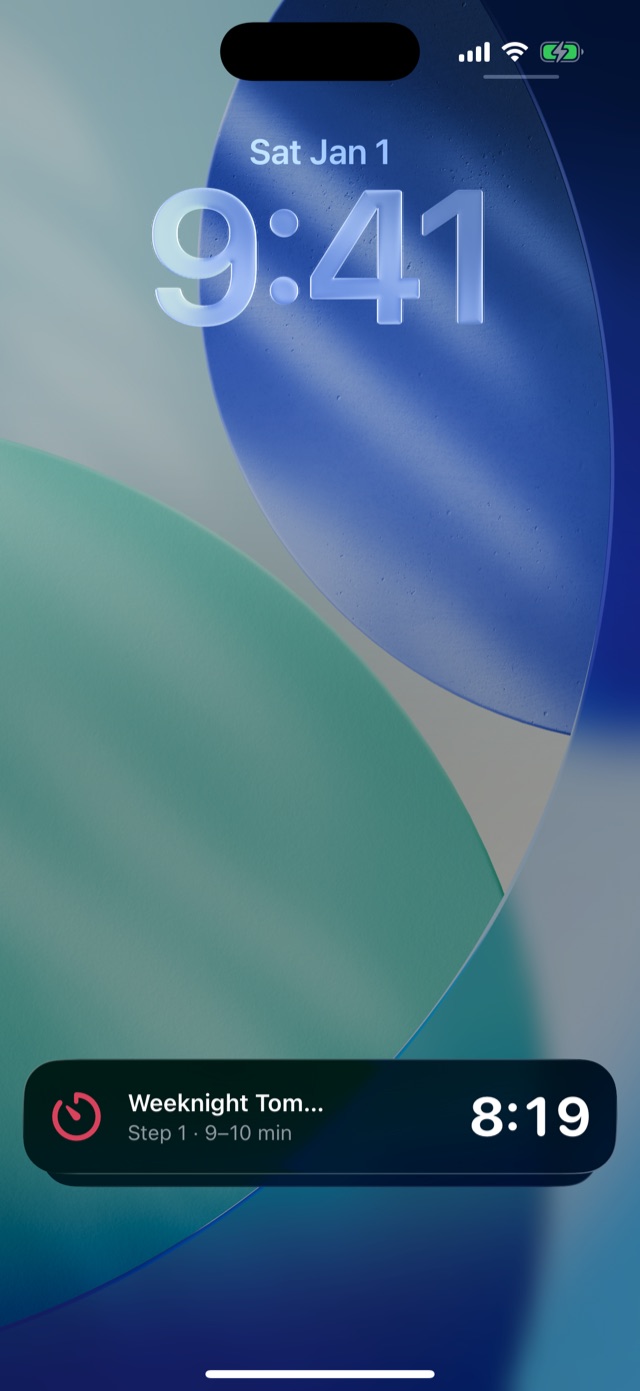
Start Cooking turns a recipe into one big step at a time. Flour on your hands? The buttons are large, and the screen stays on.

Most of your recipes already exist somewhere: a bookmark, a note, an email from your aunt. Bring them in and you can check and fix everything before it’s saved.


Decide on Sunday, stop deciding every evening. The menu holds the week; the list holds everything it needs.


Cooking is rarely a solo act. Share a cookbook and everyone sees the same recipes, the same menu and the same list.


For the nights when nothing in your own book appeals, there’s a library to search. And for the curious, a rough idea of what’s in a serving.
Tabs that open into a sidebar, recipes with the ingredients beside the method, and the whole week’s menu on one screen. Prop it up on the counter.


It’s on its way to the App Store for iPhone and iPad. When it arrives, you can start cooking without an account, and bring your family in whenever you’re ready.